
Enhancing Our Foundation on Jurisdictional Accuracy
For years the labor law poster compliance has leaned on zip codes and city names for identifying a jurisdiction. Here at GovDocs we know that method does not always portray the correct jurisdiction. It’s clear that jurisdictional precision with longitude and latitude is paramount now and into the future as the trend of local laws continues to increase. Since everything starts with the location in labor law compliance, we knew there needed to be a better way.
GovDocs is releasing an industry-first technology that pinpoints rooftop precision with latitude and longitude coordinates at a time when the rise in city and county labor law postings has made jurisdiction assignments increasingly complex.
In the past 12 months, we recorded 710 poster updates. Notably, 2024 alone has seen a 31.5% increase in new or updated mandatory postings, with 457 city and county jurisdictions affected—a number that continues to rise steadily.

With GovDocs LocationCheck, we've unlocking a smarter way to look at locations and decision-making around employment law compliance. The example pictured in the next section of this page highlights the power of this precision.
If you subscribe to our Minimum Wage and Paid Leave product, you’re familiar with this technology’s power of accurately assigning location's jurisdictions, but now all GovDocs' customers will soon realize the full benefits as part of your Postings subscription.
As part of the LocationCheck launch, we've created this playbook with step-by-step guidance to ensure compliance across all your locations:
What Jurisdiction Are These Locations In?!
You have two locations with the same zip code and the same city name, oh no! Zip codes and city names were initially made to make mail delivery easier. They weren't created to correspond to jurisdictional boundaries for cities, counties, or states.
Location #1 Mailing Address:
12345 E Hillsdale Blvd
Foster City, CA 94404
City Jursidiction: San Mateo
Location #2 Mailing Address:
12345 2222 Bridgepointe
Foster City, CA 94404
City Jursidiction: Foster City
Although, both addresses appear they would be in Foster City for their requirement city posters, once verification of LocationCheck is complete, the below list of posters highlights the two different jurisidctional requirements.
What This Means For You
GovDocs' Employment Law and Compliance team coupled with your Client Services team has conducted a full jurisdictional audit to ensure all GovDocs’ customers are in compliance with LocationCheck in place. Based on latitude and longitude precision, your unique audit is designed to help you quickly update your locations' posters based on their jurisdictional assignment.
- You have received an email communication that was sent from your Account Manager or Account Director at GovDocs. This communication either included a note that all your locations were compliant or a list of audited locations that need action taken.
- If you received a location audit, review column M which provides the next step instructions to comply with the accurate jurisdiction's postings for that location.
Easily Verify Poster Compliance at a Location-Level
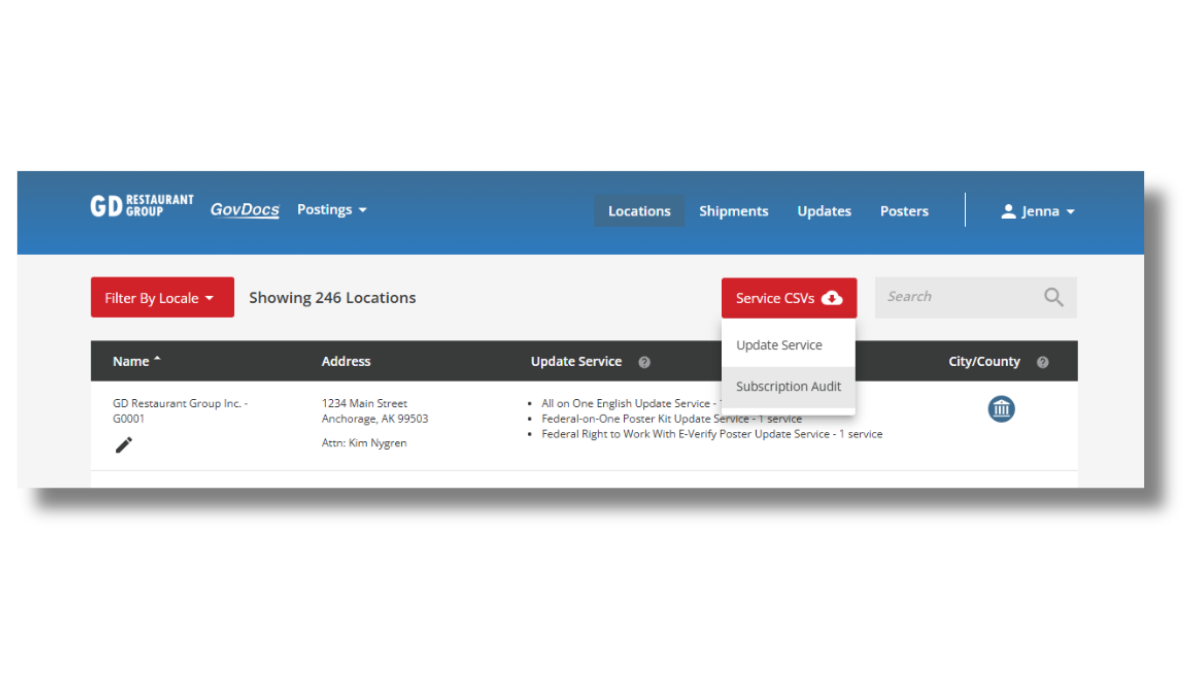
Gain visibility into your jurisdictional requirements with our new Subscription Audit Report. Employers can streamline auditing by quickly accessing a listing of all location-specific posters included in their GovDocs subscription.
A report at your fingertips to verify subscription posters for each location, to ease communication with location managers and create consistent auditing needs including: location name, posters included in GovDocs' subscription, assigned jurisdiction, + more!
Follow these easy steps to begin your audit.
1.
Login to your GovDocs Postings Dashboard & go to the Locations tab.
2.
Navigate to the Service CSVs Button and click on "Subscription Audit Report" in the drop down to download the CSV report.
3.
Open the downloaded CSV file and begin your location audit.
Frequently Asked Questions
If you're unable to find the answer you're looking for, don't hesitate to reach out to your Account Manager, Account Director, or reach out to customerservice@govdocs.com.
Your Client Services Team

Andrea Decker
Account Manager

Charitey Hemphill
Senior Customer Service Representative

Cassy Wille
Account Director

Deja Chattard
Account Manager

Doris Rivas
Account Manager, Team Lead

Olivia Menke
Account Coordinator

Tonya Koeneman
Account Manager

Emilia Zellmer
Senior Account Manager

Ryan Stilwell
Senior Account Director

Kris McCabe
Director of Client Services

Kayla Kvale
Account Manager

Sarah McLaurin
Customer Service Representative
Order Posters
Client Services

Molly Murphy
Account Manager